Two good examples to start with are the matrix transpose example and the simpleGL example.
older transpose.cu or newer transpose.cu and transpose_kernel.cu
older simpler simpleGL.cu or the newer simpleGL.cxx and simpleGL_kernel.cu
You will notice that these simple programs typically have two parts - program.cu (which runs on the host) and program_kernel.cu (which runs on the device)
Here is the main part of transpose.cu:
void runTest( int argc, char** argv)
{
// size of the matrix
const unsigned int size_x = 256;
const unsigned int size_y = 4096;
// size of memory required to store the matrix of floats
const unsigned int mem_size = sizeof(float) * size_x * size_y;
// cutil routines are in the CUDA Utiltity Library
// it has gone through a couple iterations so you may see different versions of the functions
// use command-line specified CUDA device, otherwise use device with highest Gflops/s
if( cutCheckCmdLineFlag(argc, (const char**)argv, "device") )
cutilDeviceInit(argc, argv);
else
cudaSetDevice( cutGetMaxGflopsDeviceId() );
// allocate host memory
float* h_idata = (float*) malloc(mem_size);
// initalize the memory
srand(15235911);
for( unsigned int i = 0; i < (size_x * size_y); ++i)
{
h_idata[i] = (float) i; // rand();
}
// allocate device memory (global memory of the GPU)
float* d_idata;
float* d_odata;
cutilSafeCall( cudaMalloc( (void**) &d_idata, mem_size));
cutilSafeCall( cudaMalloc( (void**) &d_odata, mem_size));
// copy host memory to device
cutilSafeCall( cudaMemcpy( d_idata, h_idata, mem_size,
cudaMemcpyHostToDevice) );
// setup execution parameters
dim3 grid(size_x / BLOCK_DIM, size_y / BLOCK_DIM, 1);
dim3 threads(BLOCK_DIM, BLOCK_DIM, 1);
// here is one way to solve the problem
transpose_naive<<< grid, threads >>>(d_odata, d_idata, size_x, size_y);
cudaThreadSynchronize();
// here is a faster more complicated way
transpose<<< grid, threads >>>(d_odata, d_idata, size_x, size_y);
cudaThreadSynchronize();
// check if kernel execution generated and error
cutilCheckMsg("Kernel execution failed");
// copy result from device to host
float* h_odata = (float*) malloc(mem_size);
cutilSafeCall( cudaMemcpy( h_odata, d_odata, mem_size,
cudaMemcpyDeviceToHost) );
// cleanup memory
free(h_idata);
free(h_odata);
free( reference);
cutilSafeCall(cudaFree(d_idata));
cutilSafeCall(cudaFree(d_odata));
cudaThreadExit();
}
int main( int argc, char** argv)
{
runTest( argc, argv);
cutilExit(argc, argv);
}
and then the kernel which has both a naive and optimized version
#define BLOCK_DIM 16
// This naive transpose kernel suffers from completely non-coalesced writes.
// it is also accessing data in global memory on the card not shared memory in the block
__global__ void transpose_naive(float *odata, float* idata, int width, int height)
{
unsigned int xIndex = blockIdx.x * BLOCK_DIM + threadIdx.x;
unsigned int yIndex = blockIdx.y * BLOCK_DIM + threadIdx.y;
if (xIndex < width && yIndex < height)
{
unsigned int index_in = xIndex + width * yIndex;
unsigned int index_out = yIndex + height * xIndex;
odata[index_out] = idata[index_in];
}
}
// This kernel is optimized to ensure all global reads and writes are coalesced,
// and to avoid bank conflicts in shared memory. This kernel is up to 11x faster
// than the naive kernel. Note that the shared memory array is sized to
// (BLOCK_DIM+1)*BLOCK_DIM. This pads each row of the 2D block in shared memory
// so that bank conflicts do not occur when threads address the array column-wise.
__global__ void transpose(float *odata, float *idata, int width, int height)
{
__shared__ float block[BLOCK_DIM][BLOCK_DIM+1];
// read the matrix tile into shared memory
unsigned int xIndex = blockIdx.x * BLOCK_DIM + threadIdx.x;
unsigned int yIndex = blockIdx.y * BLOCK_DIM + threadIdx.y;
if((xIndex < width) && (yIndex < height))
{
unsigned int index_in = xIndex + width * yIndex;
block[threadIdx.y][threadIdx.x] = idata[index_in];
}
__syncthreads(); // synchronizes all threads within a block
// everyone needs to have computed their part of shared memory before we can go on
// write the transposed matrix tile to global memory
xIndex = blockIdx.y * BLOCK_DIM + threadIdx.x;
yIndex = blockIdx.x * BLOCK_DIM + threadIdx.y;
if((xIndex < height) && (yIndex < width))
{
unsigned int index_out = xIndex + height * yIndex;
odata[index_out] = block[threadIdx.x][threadIdx.y];
}
}
lets also take a look at the same two pieces of code written in OpenCL ... which look almost identical
// This naive transpose kernel suffers from completely non-coalesced writes.
// It can be up to 10x slower than the kernel above for large matrices.
__kernel void transpose_naive(__global float *odata, __global float* idata, int offset, int width, int height)
{
unsigned int xIndex = get_global_id(0);
unsigned int yIndex = get_global_id(1);
if (xIndex + offset < width && yIndex < height)
{
unsigned int index_in = xIndex + offset + width * yIndex;
unsigned int index_out = yIndex + height * xIndex;
odata[index_out] = idata[index_in];
}
}
and then the optimized one in OpenCL:
// This kernel is optimized to ensure all global reads and writes are coalesced,
// and to avoid bank conflicts in shared memory. This kernel is up to 11x faster
// than the naive kernel below. Note that the shared memory array is sized to
// (BLOCK_DIM+1)*BLOCK_DIM. This pads each row of the 2D block in shared memory
// so that bank conflicts do not occur when threads address the array column-wise.
__kernel void transpose(__global float *odata, __global float *idata, int offset, int width, int height, __local float* block)
{
// read the matrix tile into shared memory
unsigned int xIndex = get_global_id(0);
unsigned int yIndex = get_global_id(1);
if((xIndex + offset < width) && (yIndex < height))
{
unsigned int index_in = yIndex * width + xIndex + offset;
block[get_local_id(1)*(BLOCK_DIM+1)+get_local_id(0)] = idata[index_in];
}
barrier(CLK_LOCAL_MEM_FENCE);
// write the transposed matrix tile to global memory
xIndex = get_group_id(1) * BLOCK_DIM + get_local_id(0);
yIndex = get_group_id(0) * BLOCK_DIM + get_local_id(1);
if((xIndex < height) && (yIndex + offset < width))
{
unsigned int index_out = yIndex * height + xIndex;
odata[index_out] = block[get_local_id(0)*(BLOCK_DIM+1)+get_local_id(1)];
}
}
and for completeness here are the relevant parts of ocLTranspose.cxx
int runTest( const int argc, const char** argv)
{
cl_int ciErrNum;
cl_uint ciDeviceCount;
unsigned int size_x = 256;
unsigned int size_y = 4096;
// size of memory required to store the matrix
const size_t mem_size = sizeof(float) * size_x * size_y;
//Get the NVIDIA platform
ciErrNum = oclGetPlatformID(&cpPlatform);
oclCheckError(ciErrNum, CL_SUCCESS);
//Get the devices
ciErrNum = clGetDeviceIDs(cpPlatform, CL_DEVICE_TYPE_GPU, 0, NULL, &uiNumDevices);
oclCheckError(ciErrNum, CL_SUCCESS);
cdDevices = (cl_device_id *)malloc(uiNumDevices * sizeof(cl_device_id) );
ciErrNum = clGetDeviceIDs(cpPlatform, CL_DEVICE_TYPE_GPU, uiNumDevices, cdDevices, NULL);
oclCheckError(ciErrNum, CL_SUCCESS);
//Create the context
cxGPUContext = clCreateContext(0, uiNumDevices, cdDevices, NULL, NULL, &ciErrNum);
oclCheckError(ciErrNum, CL_SUCCESS);
// Find out how many GPU's to compute on all available GPUs
size_t nDeviceBytes;
ciErrNum |= clGetContextInfo(cxGPUContext, CL_CONTEXT_DEVICES, 0, NULL, &nDeviceBytes);
ciDeviceCount = (cl_uint)nDeviceBytes/sizeof(cl_device_id);
if (ciErrNum != CL_SUCCESS)
{
shrLog(" Error %i in clGetDeviceIDs call !!!\n\n", ciErrNum);
return ciErrNum;
}
else if (ciDeviceCount == 0)
{
shrLog(" There are no devices supporting OpenCL (return code %i)\n\n", ciErrNum);
return -1;
}
// create command-queues
for(unsigned int i = 0; i < ciDeviceCount; ++i)
{
// get and print the device for this queue
cl_device_id device = oclGetDev(cxGPUContext, i);
shrLog("Device %d: ", i);
oclPrintDevName(LOGBOTH, device);
shrLog("\n");
// create command queue
commandQueue[i] = clCreateCommandQueue(cxGPUContext, device, CL_QUEUE_PROFILING_ENABLE, &ciErrNum);
if (ciErrNum != CL_SUCCESS)
{
shrLog(" Error %i in clCreateCommandQueue call !!!\n\n", ciErrNum);
return ciErrNum;
}
}
// allocate and initialize host memory
float* h_idata = (float*) malloc(mem_size);
float* h_odata = (float*) malloc(mem_size);
srand(15235911);
shrFillArray(h_idata, (size_x * size_y));
// Program Setup
size_t program_length;
char* source_path = shrFindFilePath("transpose.cl", argv[0]);
oclCheckError(source_path != NULL, shrTRUE);
char *source = oclLoadProgSource(source_path, "", &program_length);
oclCheckError(source != NULL, shrTRUE);
// create the program
cpProgram = clCreateProgramWithSource(cxGPUContext, 1,
(const char **)&source, &program_length, &ciErrNum);
oclCheckError(ciErrNum, CL_SUCCESS);
// build the program
ciErrNum = clBuildProgram(cpProgram, 0, NULL, "-cl-fast-relaxed-math", NULL, NULL);
if (ciErrNum != CL_SUCCESS)
{
// write out standard error, Build Log and PTX, then return error
shrLogEx(LOGBOTH | ERRORMSG, ciErrNum, STDERROR);
oclLogBuildInfo(cpProgram, oclGetFirstDev(cxGPUContext));
oclLogPtx(cpProgram, oclGetFirstDev(cxGPUContext), "oclTranspose.ptx");
return(EXIT_FAILURE);
}
// Run both naive and optimized kernels
double naiveTime = transposeGPU("transpose_naive", false, ciDeviceCount, h_idata, h_odata, size_x, size_y);
double optimizedTime = transposeGPU("transpose", true, ciDeviceCount, h_idata, h_odata, size_x, size_y);
// cleanup memory
free(h_idata);
free(h_odata);
free(reference);
free(source);
free(source_path);
// cleanup OpenCL
ciErrNum = clReleaseProgram(cpProgram);
for(unsigned int i = 0; i < ciDeviceCount; ++i)
{
ciErrNum |= clReleaseCommandQueue(commandQueue[i]);
}
ciErrNum |= clReleaseContext(cxGPUContext);
oclCheckError(ciErrNum, CL_SUCCESS);
return 0;
}
where transposeGPU is:
double transposeGPU(const char* kernelName, bool useLocalMem, cl_uint ciDeviceCount,
float* h_idata, float* h_odata, unsigned int size_x, unsigned int size_y)
{
cl_mem d_odata[MAX_GPU_COUNT];
cl_mem d_idata[MAX_GPU_COUNT];
cl_kernel ckKernel[MAX_GPU_COUNT];
size_t szGlobalWorkSize[2];
size_t szLocalWorkSize[2];
cl_int ciErrNum;
// Create buffers for each GPU
// Each GPU will compute sizePerGPU rows of the result
size_t sizePerGPU = shrRoundUp(BLOCK_DIM, (size_x+ciDeviceCount-1) / ciDeviceCount);
// size of memory required to store the matrix
const size_t mem_size = sizeof(float) * size_x * size_y;
for(unsigned int i = 0; i < ciDeviceCount; ++i){
// allocate device memory and copy host to device memory
d_idata[i] = clCreateBuffer(cxGPUContext, CL_MEM_READ_ONLY | CL_MEM_COPY_HOST_PTR,
mem_size, h_idata, &ciErrNum);
oclCheckError(ciErrNum, CL_SUCCESS);
// create buffer to store output
d_odata[i] = clCreateBuffer(cxGPUContext, CL_MEM_WRITE_ONLY ,
sizePerGPU*size_y*sizeof(float), NULL, &ciErrNum);
oclCheckError(ciErrNum, CL_SUCCESS);
// create the naive transpose kernel
ckKernel[i] = clCreateKernel(cpProgram, kernelName, &ciErrNum);
oclCheckError(ciErrNum, CL_SUCCESS);
// set the args values for the naive kernel
size_t offset = i * sizePerGPU;
ciErrNum = clSetKernelArg(ckKernel[i], 0, sizeof(cl_mem), (void *) &d_odata[i]);
ciErrNum |= clSetKernelArg(ckKernel[i], 1, sizeof(cl_mem), (void *) &d_idata[0]);
ciErrNum |= clSetKernelArg(ckKernel[i], 2, sizeof(int), &offset);
ciErrNum |= clSetKernelArg(ckKernel[i], 3, sizeof(int), &size_x);
ciErrNum |= clSetKernelArg(ckKernel[i], 4, sizeof(int), &size_y);
if(useLocalMem)
{
ciErrNum |= clSetKernelArg(ckKernel[i], 5, (BLOCK_DIM + 1) * BLOCK_DIM * sizeof(float), 0 );
}
}
oclCheckError(ciErrNum, CL_SUCCESS);
// set up execution configuration
szLocalWorkSize[0] = BLOCK_DIM;
szLocalWorkSize[1] = BLOCK_DIM;
szGlobalWorkSize[0] = sizePerGPU;
szGlobalWorkSize[1] = shrRoundUp(BLOCK_DIM, size_y);
shrLog("\nProcessing a %d by %d matrix of floats...\n\n", size_x, size_y);
for(unsigned int k=0; k < ciDeviceCount; ++k){
ciErrNum |= clEnqueueNDRangeKernel(commandQueue[k], ckKernel[k], 2, NULL,
szGlobalWorkSize, szLocalWorkSize, 0, NULL, NULL);
}
oclCheckError(ciErrNum, CL_SUCCESS);
// Block CPU till GPU is done
for(unsigned int k=0; k < ciDeviceCount; ++k){
ciErrNum |= clFinish(commandQueue[k]);
}
oclCheckError(ciErrNum, CL_SUCCESS);
// Copy back to host
for(unsigned int i = 0; i < ciDeviceCount; ++i){
size_t offset = i * sizePerGPU;
size_t size = MIN(size_x - i * sizePerGPU, sizePerGPU);
ciErrNum |= clEnqueueReadBuffer(commandQueue[i], d_odata[i], CL_TRUE, 0,
size * size_y * sizeof(float), &h_odata[offset * size_y],
0, NULL, NULL);
}
oclCheckError(ciErrNum, CL_SUCCESS);
for(unsigned int i = 0; i < ciDeviceCount; ++i){
ciErrNum |= clReleaseMemObject(d_idata[i]);
ciErrNum |= clReleaseMemObject(d_odata[i]);
ciErrNum |= clReleaseKernel(ckKernel[i]);
}
oclCheckError(ciErrNum, CL_SUCCESS);
return time;
}
This is going to take a 256 x 4096 matrix and create a 4096 x 256 matrix by turning the rows of the input matrix into columns in the output matrix. There are 1,048,576 elements in the matrix. The grid has 16 x 256 blocks and each block has 16 x 16 threads.
In the naive version the first 16 x 16 block does the following reading and writing to / from global memory.
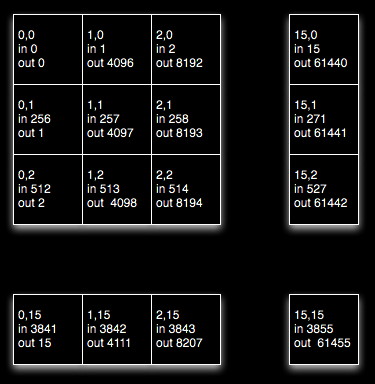
The optimized version of the first 16 x 16 block does the following in the first phase. It looks like the kernels are writing into the same column (bank) of shared memory which would be bad, but the shared memory is declared to be of size [BLOCK_DIM][BLOCK_DIM+1] which avoids the bank conflict problem by adding an extra column to each row which offsets subsequent rows by 1.
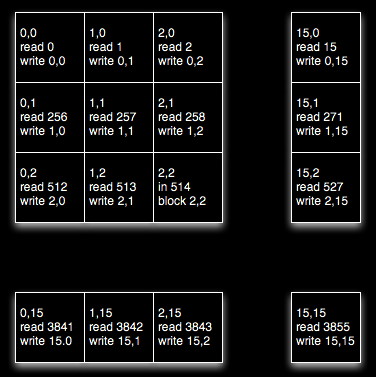
shared memory is divided into 16 memory banks. Successive 32bit words fall into successive banks.
0 1 2 3 4 5 6 7 8 9 10 11 12 13 14 15
16 17 18 19 20 21 22 23 24 25 26 27 28 29 30 31
32 33 34 35 36 37 38 39 40 41 42 43 44 45 46 47
warp size is 32 giving us a half-warp size of 16. If multiple threads in the same half-warp try to access the same memory bank then we get bank conflicts, since all 16 threads run at the same time and they need to access different parts of the same memory bank.
if we have a half warp of 16 threads trying to access shared memory 0 through 15 then things are great. If some of the threads in the half warp are trying to access 0 16 32 etc then we are in trouble, and instead of grabbing all 16 32-bit words at once we need to use 16 separate calls. That's bad, and that's what would happen if we didn't add in the offset [BLOCK_DIM][BLOCK_DIM+1]
Given that we have used the offset then the first 'column' of block makes use of 0, 17, 34, etc, 1 in each successive bank, which is nice.
and this in the second phase where the kernels read from sequential locations in shared memory which is good for avoiding bank conflicts.
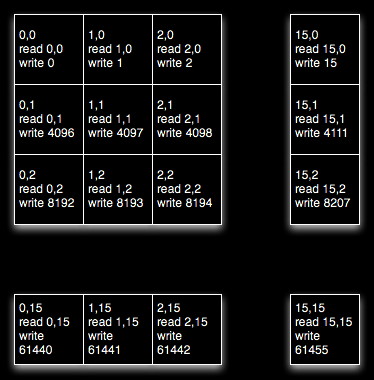
note that we have increased the amount of memory we are using, and doubled the number of memory accesses, but yet we have sped up the execution by a factor of 100. In GPU coding you can get dramatic improvements by taking advantage of the way the hardware is organized. Similarly you can lose a lot of speed by being ignorant of how the hardware is organized. As you might expect there is a lot of work for people writing compilers to try and help people optimize naive code.
why is this so much faster?
Shared Memory can be as fast as registers. Local Memory and Global Memory can be 150 times slower.
There is also an improvement in the way global memory is accessed. There is a nice overview of this in part 6 of the Dr Dobbs article:
Global memory delivers the highest memory bandwidth only when the global memory accesses can be coalesced within a half-warp so the hardware can then fetch (or store) the data in the fewest number of transactions. CUDA devices can fetch data in a single 64-byte or 128-byte transaction. If the memory transaction cannot be coalesced, then a separate memory transaction will be issued for each thread in the half-warp, which is undesirable. The performance penalty for non-coalesced memory operations varies according to the size of the data type. In particular in our case 32-bit data types will be roughly 10x slower.
Global memory access by all threads in the half-warp of a block can be coalesced into efficient memory transactions on a G80 architecture when:
- The threads access 32-bit, 64-bit or 128-bit data types.
- All 16 words of the
transaction lie in the same segment of size equal to the
memory transaction size.
- Threads must access the
words in sequence: the kth thread in the half-warp must
access the kth word.
some useful built in variables:
dim3 gridDim - dimension of the grid in blocks (only 2 dimensional for now, no z yet)
dim3 blockDim - dimensions of the block in threads
dim3 blockIdx - block index within grid
dim3 threadIdx - thread index within block
If you want to see how the code runs in cuda emulation mode then you can set the emu environment variable to 1 (e.g. in tcsh: setenv emu 1) and then make in the example's project directory. You will find the executable in bin/linux/emurelease. You will also notice that things run a lot slower.
Device emulation mode is good when you don't have a compatible machine to do your coding on. It is also useful if you want to put some printfs into the kernel to see what is happening. You can't use printf to debug your code when you are running the kernel on the GPU.
Some things to keep in mind when writing a kernel: no recursion, no static variables, no variable number of arguments.
When dealing with arrays CUDA follows the C model with memory allocated in row-major order (first row then second row then third row, etc.) Its usually better to think about arrays as being linearized.
If there is time we will also go over the simpleGL example: simpleGL.cu and simpleGL_kernel.cu